Shopify Create Permalinks
1. Permalink to Checkout
To create a direct link to the checkout with a specific product variant:
- Use the following format:
https://markstestingstore.com/cart/{variant_id}:{quantity}/checkout - Replace
{variant_id}withyour variant IDand{quantity}with the desired quantity. - Example:
https://markstestingstore.com/cart/51949159841814:1/checkout
2. Permalink to Checkout Using Discount Code
To include a discount code in the checkout link:
- Use the following format:
https://markstestingstore.com/cart/{variant_id}:{quantity}/checkout?discount={discount_code} - Replace
{variant_id}withyour variant ID,{quantity}with the desired quantity, and{discount_code}withYour Discount code. - Example:
https://markstestingstore.com/cart/51949159841814:1/checkout?discount=PERMALINKDISCOUNT
3. Permalink to Cart
To create a direct link to the cart with a specific product variant:
- Use the following format:
https://markstestingstore.com/cart/{variant_id}:{quantity} - Replace
{variant_id}withyour variant IDand{quantity}with the desired quantity. - Example:
https://markstestingstore.com/cart/51949159841814:1
4. Permalink to Cart Using Discount Code
To include a discount code in the cart link:
- Use the following format:
https://markstestingstore.com/cart/{variant_id}:{quantity}?discount={discount_code} - Replace
{variant_id}withyour variant ID,{quantity}with the desired quantity, and{discount_code}with Your discount code - Example:
https://markstestingstore.com/cart/51949159841814:1?discount=PERMALINKDISCOUNT
Finding the Variant ID
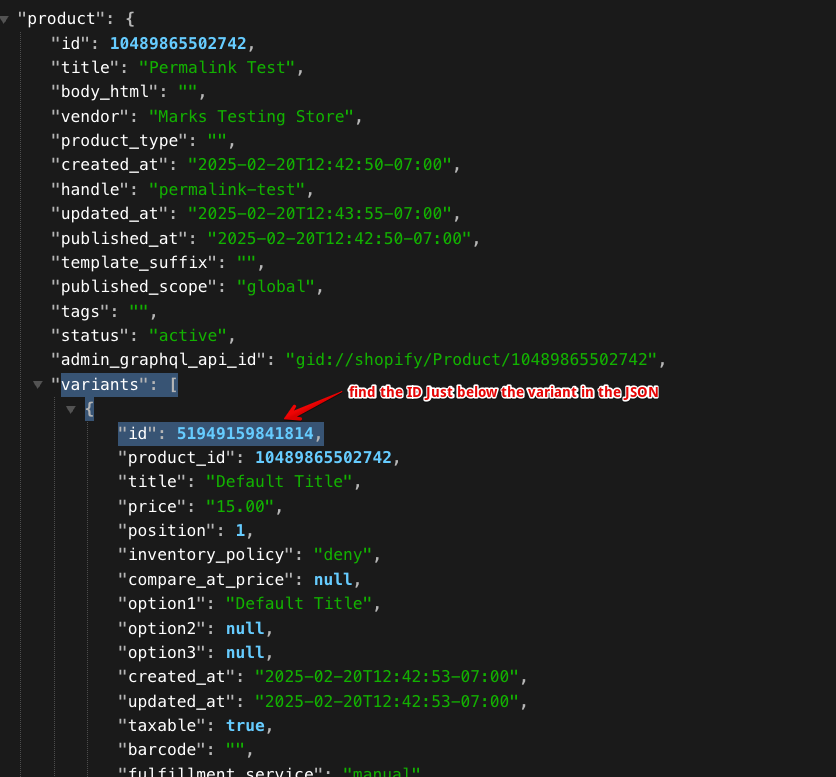
- Navigate to your product in the Shopify admin.
- Add
.jsonto the end of the product URL to view the JSON data. - Locate the
variantssection and find theidfor the variant you need.
These steps will help you create permalinks for your Shopify store. If you have any further questions or need additional assistance, feel free to reach out!